How Do QR Codes Work? A Simple Guide to QR Code Technology
You have probably seen QR codes almost everywhere: on restaurant tables, product packaging, posters, tickets, payment counters, websites, advertisements, and even business cards.
They look like simple black-and-white squares filled with tiny patterns. But when you point your smartphone camera at one, your phone can instantly recognize the pattern and open a website, display information, connect to a service, or perform another action.
So how do QR codes work?
How can a collection of tiny squares contain useful information, and how does your phone know what those squares mean?
The technology behind QR codes is surprisingly clever. It combines a structured grid, encoded data, special positioning patterns, error correction, and image recognition.
Let’s take a simple look at how QR codes work and why they have become such a common part of modern technology.
1. What Is a QR Code?
QR stands for “Quick Response.”
A QR code is a type of two-dimensional barcode that can store information in a pattern of small squares called modules.
Unlike traditional one-dimensional barcodes, which generally store information across a line, QR codes use both horizontal and vertical dimensions.
This allows them to store considerably more information than many traditional barcodes.
A QR code can represent different types of information, including website addresses, text, contact information, payment-related data, and other structured information.
2. How Do QR Codes Work?
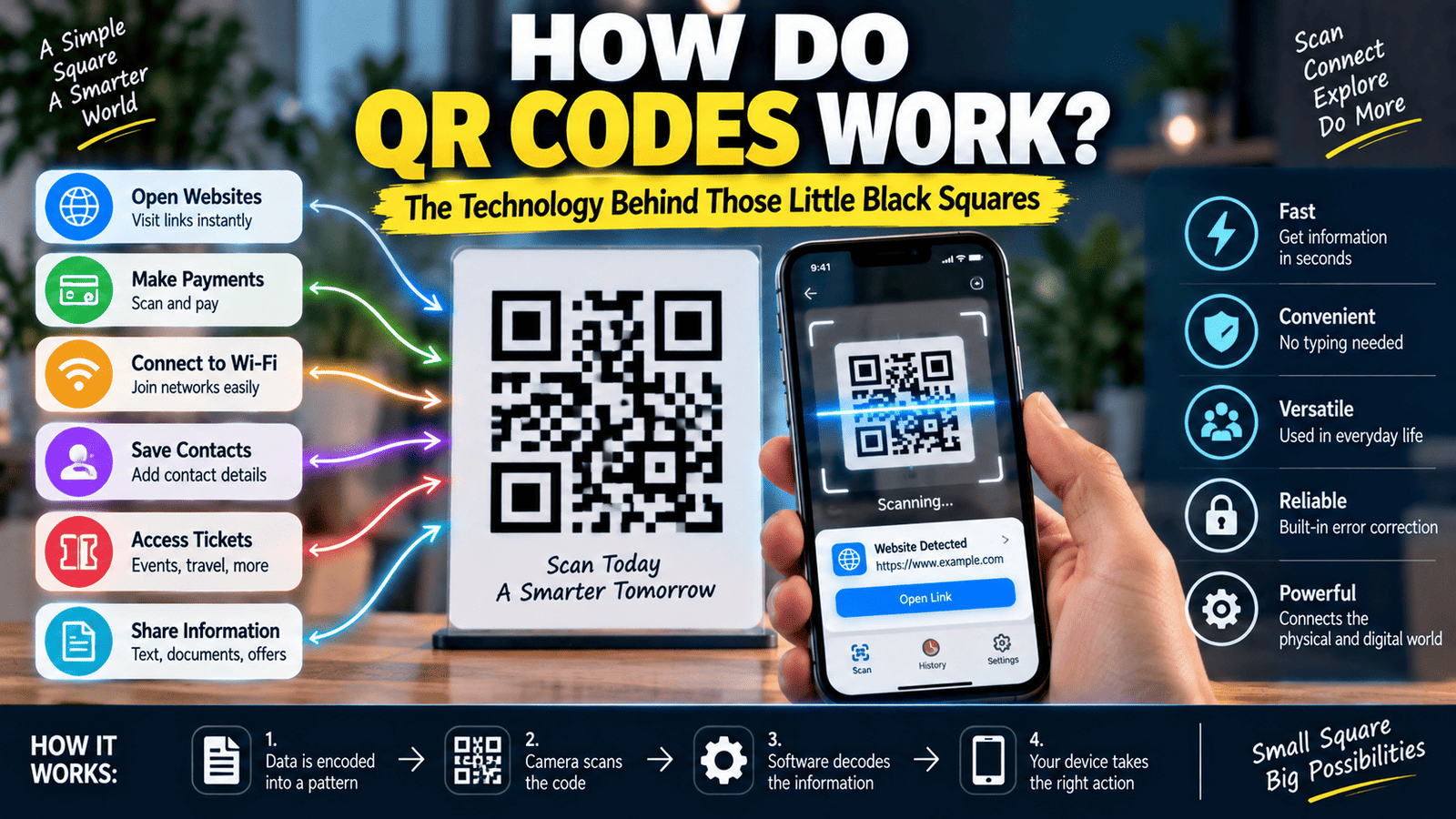
A QR code works by converting information into a specific pattern of dark and light modules.
When you create a QR code, software takes the information you want to store and converts it into a format that can be represented inside the QR code’s grid.
Your phone’s camera then captures an image of that grid.
QR-scanning software analyzes the image, identifies the structure of the code, reads the modules, reconstructs the encoded data, and then determines what action should be associated with that information.
For example, if the QR code contains a website address, your phone may offer to open that address in a browser.
3. Why Do QR Codes Look Like Black-and-White Squares?
The small black and white squares are called modules.
These modules represent information and structural elements used by the QR code system.
The contrast between dark and light areas makes it easier for cameras and image-processing software to distinguish the different parts of the code.
Although black and white is extremely common, QR codes can technically be created using other colors as long as there is sufficient contrast for reliable scanning.
However, unusual color combinations, low contrast, reflections, or complicated backgrounds can make scanning more difficult.
4. What Are the Three Big Squares on a QR Code?
Most familiar QR codes have three large square patterns positioned near three corners.
These are called finder patterns.
Their purpose is to help a scanner identify the QR code and determine its orientation.
Because the finder patterns have a distinctive structure, image-processing software can recognize them even when the QR code is photographed from an angle.
Once the scanner identifies these patterns, it can better understand the location and orientation of the rest of the code.
5. Why Can a QR Code Be Scanned From Different Angles?
QR codes are designed so that scanning software can identify their structure even when the code is not perfectly straight in front of the camera.
The finder patterns help the software determine the geometry of the code.
The scanner can then correct for perspective and transform the captured image into a form that can be analyzed more easily.
This is why you can often scan a QR code from a slight angle instead of holding your phone perfectly parallel to it.
6. What Is the White Space Around a QR Code?
You may notice that QR codes usually have a blank area around their outside edges.
This area is known as the quiet zone.
The quiet zone provides visual separation between the QR code and its surrounding environment.
Without enough separation, a scanner may have difficulty determining where the QR code begins and ends.
This is why placing text, graphics, or other patterns directly against the edges of a QR code can sometimes reduce scanning reliability.
7. How Much Information Can a QR Code Store?
The amount of information a QR code can store depends on several factors, including its version, the type of data being encoded, and the error-correction level.
QR codes come in different sizes, ranging from relatively small grids to much larger ones containing many more modules.
Larger QR codes can store more information, but they also contain smaller individual modules when printed at the same physical size.
For everyday uses such as website links, payment information, or short pieces of text, a relatively small QR code is often sufficient.
8. What Is QR Code Error Correction?
One of the most useful features of QR codes is error correction.
A QR code can include additional information that allows the scanner to recover some of the original data even if part of the code is damaged, dirty, covered, or unreadable.
This is why a QR code may sometimes continue to work even when a small portion of it has been scratched or covered.
QR codes use a mathematical error-correction method based on Reed-Solomon error correction.
Different error-correction levels provide different balances between data capacity and the amount of damage that can potentially be recovered.
9. Why Can Some QR Codes Work Even When Part of Them Is Missing?
Error correction is the main reason.
When a QR code is generated, additional recovery information can be included alongside the encoded data.
If a scanner cannot read some modules, the error-correction process can use the remaining information to reconstruct missing or corrupted data, within the limits of the selected error-correction level.
This does not mean a QR code can survive unlimited damage.
If too much of the code is destroyed or obscured, the scanner may no longer have enough information to recover the original data.
10. How Does Your Phone Scan a QR Code?
When you point your smartphone camera at a QR code, the camera captures an image containing the code.
The scanning software then looks for patterns that resemble a QR code.
It identifies the finder patterns, determines the orientation and geometry, analyzes the grid, and interprets the modules.
The software then decodes the stored information and presents an appropriate action to you.
Modern smartphones can perform much of this process automatically through their camera applications.
11. Does a QR Code Need an Internet Connection?
A QR code itself does not require an internet connection to be scanned.
The code is simply an encoded pattern of information.
However, what happens after scanning may require internet access.
For example, if a QR code contains a website address, your phone can read the address without internet access, but opening the website will normally require a network connection.
Similarly, some payment or online services require an active internet connection to complete the transaction or retrieve additional information.
12. Can a QR Code Store a Website Link?
Yes. Website links are one of the most common uses of QR codes.
A QR code can contain a URL such as a webpage address.
When your phone scans the code, the scanner recognizes the URL and can offer to open it in a browser.
This makes QR codes useful for posters, restaurant menus, product packaging, advertisements, event tickets, business cards, and many other situations where users need quick access to online information.
13. How Do QR Code Payments Work?
QR codes can also be used in digital payment systems.
A payment-related QR code can contain information that helps a payment application identify a recipient, merchant, account, transaction details, or another required piece of information.
When a user scans the code, the payment application reads the encoded information and presents the relevant payment interface.
The exact process depends on the payment system, country, financial institution, and application involved.
The QR code itself does not magically transfer money. It provides encoded information that helps the payment system identify or initiate the transaction.
14. Are QR Codes Encrypted?
A QR code is not automatically encrypted simply because it is a QR code.
QR technology is primarily a method for encoding information into a visual pattern.
If sensitive information is placed into a QR code without additional protection, someone who scans it may be able to read that information.
Security therefore depends on what information the QR code contains and how the service using it handles that information.
For example, a QR code containing a public website address does not need the same type of protection as information used within a secure payment or authentication system.
15. Can a QR Code Be Dangerous?
The QR code format itself is not inherently dangerous, but the content behind a QR code can be.
A QR code can direct a user to a website, application, download, payment page, or another destination.
If the destination is malicious or deceptive, scanning the QR code can expose the user to risks similar to clicking an unknown link.
For this reason, it is sensible to check the destination shown by your phone before opening an unfamiliar QR code, especially when the code comes from an unexpected source.
16. What Is QR Code Phishing?
QR code phishing is sometimes called “quishing.”
It involves using QR codes to direct people toward deceptive websites or other malicious destinations.
For example, a criminal could place a fake QR code over a legitimate one on a poster or payment-related location.
The user may scan it believing they are visiting a legitimate service, while the QR code actually sends them somewhere else.
The lesson is simple: a QR code should be treated like any other link. The fact that it is displayed as a square image does not automatically make its destination trustworthy.
17. Why Do QR Codes Sometimes Fail to Scan?
There are several reasons a QR code may fail to scan.
The code may be too small, blurry, damaged, poorly printed, distorted, or displayed with insufficient contrast.
Lighting and reflections can also make it difficult for the camera to capture a clear image.
Another possibility is that the code contains too much information for its physical size, resulting in very small modules that are difficult for the camera to distinguish.
Keeping an adequate quiet zone around the code and maintaining strong contrast generally improves scanning reliability.
18. Can You Put a QR Code on a Product or Poster?
Yes. QR codes are frequently printed on physical materials.
They can appear on product packaging, menus, posters, brochures, tickets, labels, receipts, business cards, signs, and many other surfaces.
When designing a printed QR code, it is important to make sure it is large enough to scan comfortably and has sufficient contrast.
The surface should also be reasonably flat and free from excessive glare or distortion.
19. Can QR Codes Be Customized?
QR codes can be customized visually, but customization should not interfere with their ability to be scanned.
Some designs use brand colors, logos, rounded modules, or other decorative elements.
However, removing too much of the required structure, reducing contrast, covering important areas, or adding excessive visual complexity can make the code unreliable.
Error correction can provide some tolerance, but it should not be treated as permission to cover large parts of the code.
20. What Is the Difference Between a Static and Dynamic QR Code?
The terms static and dynamic QR code are commonly used in marketing and business services.
A static QR code generally contains information directly in the code itself, such as a fixed website address.
A dynamic QR code typically points to a destination that can be managed or changed through an external service.
This means the printed QR code can potentially remain the same while the destination associated with it is updated through that service.
Dynamic QR code services may also provide additional features such as analytics, depending on the provider.
21. Can QR Codes Store Wi-Fi Information?
Yes. QR codes can be used to encode Wi-Fi network information in a format that compatible devices can recognize.
A QR code may contain information such as the network name and other connection details.
When scanned by a compatible device, the information can make joining the network easier.
This can be useful in homes, offices, hotels, restaurants, and other locations where guests need convenient access to a wireless network.
22. Can QR Codes Store Contact Information?
QR codes can also contain structured contact information.
For example, a QR code on a business card can provide information that a compatible phone can use to create a contact.
This can reduce the need to manually type names, phone numbers, email addresses, or other contact details.
The exact information supported depends on the format used by the QR-code generator and the scanning application.
23. Why Did QR Codes Become So Popular?
QR codes became especially useful because modern smartphones made scanning them extremely convenient.
Instead of requiring a specialized barcode scanner, many people can simply point their phone camera at a QR code.
The codes are also inexpensive to create and can be printed almost anywhere.
Their ability to connect physical objects and locations with digital information has made them useful for marketing, payments, authentication, menus, tickets, product information, and many other applications.
24. How Do QR Codes Connect the Physical and Digital Worlds?
A QR code is essentially a bridge between something physical and information stored or accessed digitally.
A restaurant menu can contain a QR code that opens a digital menu.
A product package can contain a code that opens additional product information.
A poster can contain a code that directs visitors to an event registration page.
A business card can contain a code that shares contact information.
In each case, the QR code gives a smartphone a quick way to translate something visible in the physical world into digital information.
25. How Do QR Codes Work in Simple Terms?
The simplest explanation is this:
A QR code converts information into a structured pattern of small dark and light squares.
Your smartphone camera captures that pattern.
Scanning software identifies the QR code’s special patterns, determines its orientation, reads the modules, applies error correction when necessary, and decodes the information.
Your phone then uses that information to perform an appropriate action, such as opening a website, displaying text, connecting to a service, or starting a supported payment process.
Final Thoughts
QR codes may look like nothing more than collections of tiny black and white squares, but they are actually carefully designed information systems.
Finder patterns help scanners identify the code, modules store information, error correction helps recover damaged data, and smartphone cameras make the technology easy to use.
From digital payments and restaurant menus to tickets, websites, products, and business cards, QR codes have become an important bridge between physical objects and digital services.
The next time you scan one with your phone, you will know that those little squares are doing much more than simply looking like a random pattern.
If you enjoyed learning how everyday technology works, you can also read our guides on how Wi-Fi works, how GPS works, and how Bluetooth works.