How Does Bluetooth Work? A Simple Guide to Bluetooth Technology
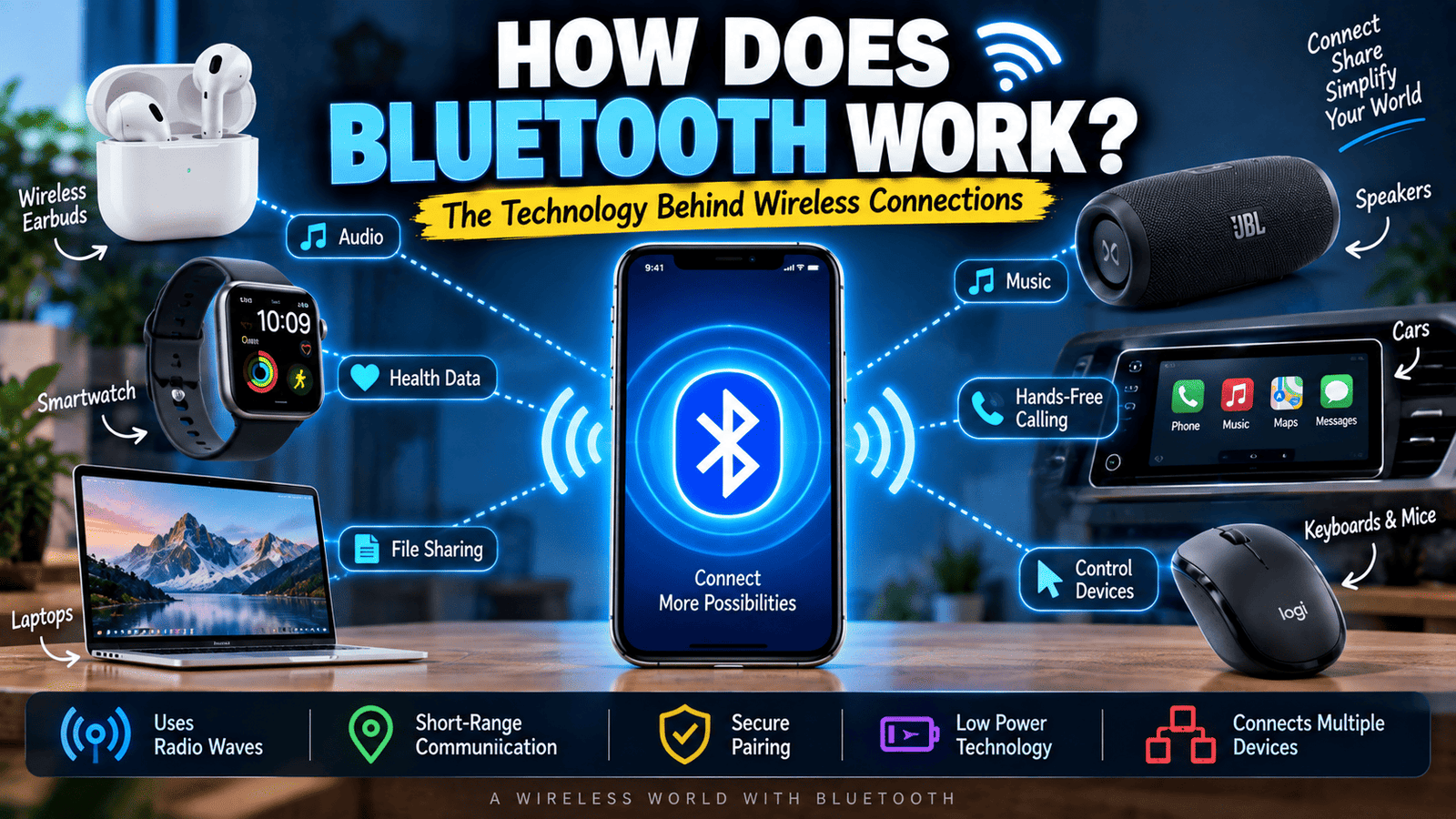
Bluetooth has become one of the most common wireless technologies in everyday life. You use it when connecting wireless earbuds to a phone, pairing a smartwatch with a smartphone, using a wireless keyboard, or sending information between compatible devices.
But how does Bluetooth actually work?
How can two devices sitting close to each other communicate without a cable? And how does your phone know which wireless headphones you want to connect to?
The answer involves short-range radio communication, device discovery, pairing, security, and carefully designed wireless protocols.
Let’s take a simple look at how Bluetooth works and why it has become so useful in modern devices.
1. What Is Bluetooth?
Bluetooth is a wireless communication technology designed to allow compatible devices to exchange information over relatively short distances.
Unlike Wi-Fi, which is commonly used to connect devices to a local network and the internet, Bluetooth is often used for direct communication between nearby devices.
For example, your smartphone can connect directly to wireless earbuds through Bluetooth without requiring the earbuds to connect to your home Wi-Fi network.
Bluetooth is used in smartphones, headphones, speakers, keyboards, mice, watches, cars, fitness devices, medical equipment, and many other products.
2. How Does Bluetooth Work?
Bluetooth uses radio waves to transmit information between compatible devices.
The devices contain Bluetooth radios and antennas that allow them to send and receive wireless signals.
When two Bluetooth devices establish a connection, they communicate according to Bluetooth protocols that define how information is discovered, exchanged, and managed.
The communication happens over short distances, making Bluetooth particularly useful for personal devices and accessories.
3. Does Bluetooth Use Radio Waves?
Yes. Bluetooth communicates using radio waves in the 2.4 GHz industrial, scientific, and medical radio band.
This is part of the same general frequency range used by several other wireless technologies, including some Wi-Fi networks.
Bluetooth is designed to share this crowded part of the radio spectrum through techniques that help reduce interference and maintain communication.
Because Bluetooth operates at relatively low power and is intended primarily for nearby devices, it is well suited to personal wireless connections.
4. Why Is Bluetooth Called Short-Range Wireless Technology?
Bluetooth was designed primarily for communication between devices that are relatively close to one another.
The practical range depends on several factors, including the Bluetooth version, device design, antenna quality, transmit power, obstacles, and the specific Bluetooth class being used.
Some Bluetooth devices may work across a room, while specialized implementations can provide much greater range under suitable conditions.
Walls, furniture, people, and other objects can also affect wireless performance.
5. What Happens When You Turn Bluetooth On?
When you enable Bluetooth on a smartphone or another device, its Bluetooth hardware becomes available for wireless communication.
Depending on the device and settings, it may begin scanning for nearby compatible devices or become discoverable when you choose to pair it with another product.
Your phone might then display nearby headphones, speakers, keyboards, watches, or other Bluetooth devices that are available for connection.
The exact behavior depends on the operating system and the type of Bluetooth device involved.
6. How Does Bluetooth Pairing Work?
Pairing is the process of establishing a trusted relationship between two Bluetooth devices.
For example, when you connect a new pair of wireless earbuds to your phone, the two devices first need to identify each other and establish the information necessary for communication.
Depending on the device, pairing may involve confirming a code, entering a PIN, pressing a button, or simply approving a connection request.
After successful pairing, devices can often reconnect automatically when they are nearby and Bluetooth is enabled.
7. Why Do You Usually Pair Bluetooth Devices Only Once?
Once two devices have successfully completed the pairing process, they can store information that allows them to recognize each other during future connections.
This means you normally do not have to repeat the entire pairing process every time you want to use your headphones or smartwatch.
For example, after pairing your earbuds with your phone, the earbuds may automatically reconnect when you take them out of their charging case.
The exact reconnection behavior depends on the devices and their software.
8. What Is Bluetooth Discovery?
Before two devices can establish a connection, they generally need a way to identify compatible devices that are nearby.
This is where Bluetooth discovery comes into play.
A device that is made discoverable can announce its presence so another compatible device can detect it.
For example, when you open your phone’s Bluetooth settings and see the name of a nearby speaker, your phone has detected a Bluetooth device that is available for interaction.
9. Why Does Your Phone Show Bluetooth Device Names?
Bluetooth devices can provide identifying information that allows users to recognize them during setup.
Instead of seeing an unknown technical identifier, you might see a product name such as “Wireless Earbuds” or the manufacturer’s chosen device name.
This makes the pairing process easier because users can identify which nearby device they actually want to connect.
Many devices also allow the Bluetooth name to be changed through their settings.
10. How Do Bluetooth Headphones Receive Sound?
When you play music on your phone using Bluetooth headphones, the audio data is converted into a form that can be transmitted wirelessly.
Your phone sends the audio information through the Bluetooth connection to the headphones.
The headphones receive the wireless data, process it, and convert it into an electrical audio signal that drives their speakers.
The entire process happens quickly enough that you normally hear the music as if the phone were physically connected to the headphones.
11. Why Can Bluetooth Audio Have a Small Delay?
Bluetooth audio involves several processing steps.
Audio must be encoded, transmitted wirelessly, received, decoded, and then converted into sound.
These steps can introduce a small amount of latency.
For normal music listening, the delay may be barely noticeable. However, latency can become more obvious when watching videos, playing games, or using applications where audio and visual information need to remain closely synchronized.
Modern Bluetooth technologies and audio codecs can reduce latency, but the exact performance depends on the devices and software involved.
12. What Is a Bluetooth Codec?
A Bluetooth audio codec is a technology used to encode and decode audio for wireless transmission.
Different Bluetooth audio implementations can support different codecs.
The codec influences factors such as audio compression, data requirements, latency, and sometimes perceived audio quality.
Both the sending device and receiving device need compatible support for a particular codec for it to be used.
13. Can Bluetooth Connect to Multiple Devices?
Bluetooth technology supports different types of connections and device relationships, so the answer depends on the devices and Bluetooth features involved.
For example, a smartphone may maintain connections with multiple Bluetooth accessories for different purposes.
Some modern Bluetooth features also make it possible to share audio or communicate with multiple compatible devices in ways that older Bluetooth implementations could not.
However, the number and type of simultaneous connections depend on the hardware, operating system, Bluetooth profile, and specific features supported by the devices.
14. What Is Bluetooth Low Energy?
Bluetooth Low Energy, commonly called Bluetooth LE, is a Bluetooth technology designed with efficient power consumption in mind.
It is especially useful for devices that need to operate for long periods using small batteries.
Examples include fitness trackers, sensors, smart tags, watches, and other small connected devices.
Bluetooth LE can support applications where devices exchange relatively small amounts of information while trying to conserve battery power.
15. Is Bluetooth the Same as Wi-Fi?
Bluetooth and Wi-Fi are both wireless technologies, but they are designed for different types of communication.
Bluetooth is commonly used for short-range connections between personal devices and accessories.
Wi-Fi is commonly used to connect devices to a local network and, through that network, to internet services.
For example, wireless headphones may use Bluetooth to receive audio from your phone, while the phone itself may use Wi-Fi to stream that music from the internet.
Both technologies can therefore work together without performing the same job.
16. Why Does Bluetooth Sometimes Disconnect?
Bluetooth connections can be affected by distance, obstacles, interference, low battery levels, software problems, and device compatibility.
If you move too far away from the connected device, the wireless signal may become too weak to maintain a reliable connection.
Physical obstacles can also affect signal quality.
In some situations, restarting Bluetooth, reconnecting the devices, updating software, or moving the devices closer together can resolve temporary connection problems.
17. Why Does Bluetooth Work Through Some Obstacles?
Bluetooth uses radio waves, which can travel through certain materials.
However, different materials affect radio signals differently.
Lightweight walls may have a relatively small effect, while dense materials, metal structures, and other obstacles can weaken the signal more significantly.
This is why Bluetooth devices can often communicate through a room but may struggle when separated by several walls or other substantial barriers.
18. Is Bluetooth Secure?
Bluetooth includes security mechanisms designed to help protect wireless communication between devices.
Pairing and authentication procedures can help establish trusted relationships, while encryption can help protect data during communication.
However, security also depends on the devices, software, Bluetooth implementation, and how the user configures them.
Keeping devices updated and avoiding unexpected pairing requests are sensible security practices.
19. Can Bluetooth Be Used to Transfer Files?
Bluetooth has been used to transfer files between compatible devices, although modern smartphones often use other technologies for fast file sharing.
Bluetooth file transfers can be useful in certain situations because they do not necessarily require an internet connection.
However, Bluetooth is generally not designed to compete with high-speed wired connections or modern high-bandwidth wireless networking technologies for large file transfers.
20. Why Is Bluetooth So Useful in Cars?
Bluetooth has become common in vehicles because it can connect smartphones with compatible car systems without requiring a physical cable for every function.
A car may use Bluetooth to support hands-free calling, audio streaming, and communication between the phone and the vehicle’s infotainment system.
This allows drivers to keep their phone connected while avoiding the need to physically hold it for certain supported functions.
21. How Does Bluetooth Work in Smartwatches?
A smartwatch can use Bluetooth to communicate with a nearby smartphone.
The phone may send notifications, settings, or other information to the watch, while the watch can send information such as activity data or other supported information back to the phone.
Bluetooth can therefore act as a communication bridge between the two devices.
Some smartwatches also support additional wireless technologies that allow them to operate more independently when a phone is not nearby.
22. How Far Can Bluetooth Work?
There is no single distance that applies to every Bluetooth device.
Range depends on the Bluetooth class, transmit power, antenna design, environment, device sensitivity, obstacles, and other factors.
Many everyday Bluetooth accessories are designed for relatively short distances, such as within the same room or nearby area.
Specialized Bluetooth devices can support longer ranges under appropriate conditions.
Therefore, the advertised range of one Bluetooth product should not automatically be assumed to apply to every other Bluetooth device.
23. Does Bluetooth Use a Lot of Battery?
Bluetooth power consumption depends heavily on the Bluetooth technology and how the device is using it.
Traditional Bluetooth connections can consume more power than some low-energy communication modes.
Bluetooth Low Energy was specifically designed for applications where reducing power consumption is important.
Modern smartphones and accessories are generally designed to manage Bluetooth power efficiently, so leaving Bluetooth enabled does not necessarily mean your battery will drain rapidly.
24. How Does Bluetooth Work in Simple Terms?
The simplest way to understand Bluetooth is to imagine two nearby devices speaking to each other using short-range radio signals.
First, compatible devices discover each other.
Next, they may go through a pairing and security process.
Once connected, they exchange information according to the Bluetooth features and profiles they support.
Your phone can therefore send music to headphones, a smartwatch can exchange information with a phone, and a wireless keyboard can send keystrokes to a computer without a physical cable.
25. Why Is Bluetooth Important for Modern Technology?
Bluetooth has helped make everyday electronics more convenient by reducing the need for physical cables between nearby devices.
Wireless headphones, speakers, watches, keyboards, mice, cars, fitness trackers, sensors, and many other products can communicate through Bluetooth.
Its combination of relatively low power consumption, short-range communication, device discovery, security features, and broad industry support has made it one of the most widely used wireless technologies.
Final Thoughts
Bluetooth may seem simple when you tap a device name on your phone and suddenly your headphones start playing music, but a lot happens behind that simple interaction.
Bluetooth radios, antennas, wireless protocols, pairing systems, security mechanisms, and audio or data technologies work together to create a reliable connection.
The next time you connect a wireless accessory, remember that your devices are communicating through radio waves without a physical cable between them.
And just like Wi-Fi and GPS, Bluetooth is another example of complex technology quietly working in the background of everyday life.
If you enjoyed this technology guide, you can also read our article explaining how Wi-Fi works and how wireless internet connects your devices.
You can also learn how GPS works and how satellites help determine your location.