Driving Licence Status Check Online: How to Check DL Application Status
Driving Licence Status Check Online: How to Check DL Application Status
Applied for a Driving Licence or recently submitted a Driving Licence-related application?
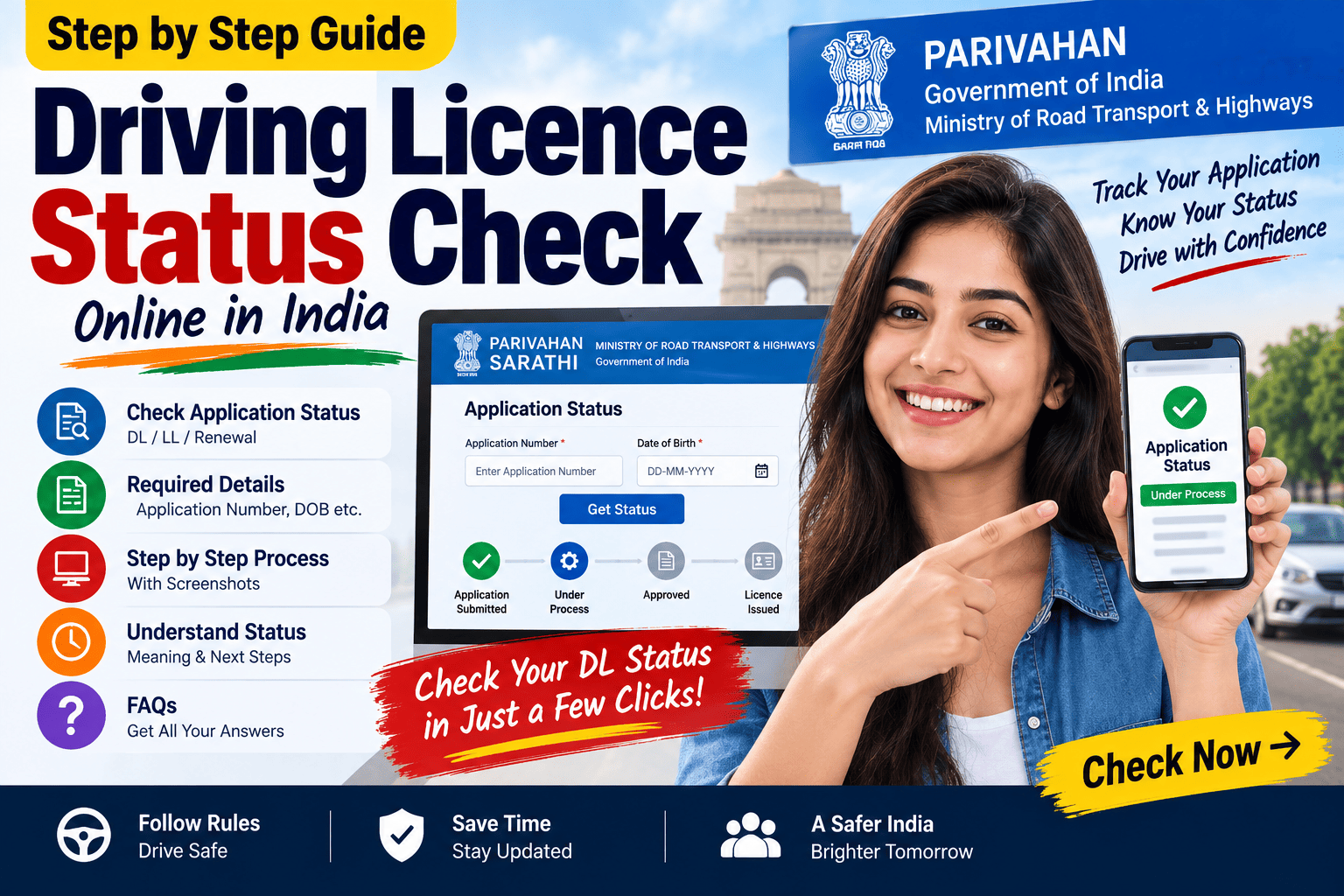
You can check the progress of your application through the Sarathi Parivahan system. The official Sarathi platform provides an Application Status facility along with other Driving Licence services such as Learner Licence application, Driving Licence application, DL services, fee payment and document upload.
In this guide, we explain how to check Driving Licence application status online, what details you may need, what different status messages can mean, and what to do if your application is pending or you cannot find your details.
Important: The exact options and workflow can vary by State/UT and the service you applied for. Always follow the instructions displayed on the official Sarathi/Parivahan portal.
What Is Driving Licence Application Status?
Driving Licence application status allows an applicant to track the progress of an application submitted through the licensing system.
For example, you may want to check the status after:
- Applying for a Learner Licence
- Applying for a new Driving Licence
- Applying for DL renewal
- Applying for a duplicate Driving Licence
- Applying for another DL-related service
- Completing a driving test
- Submitting documents
- Paying the applicable fee
The Sarathi system includes an Application Status option among its citizen-facing Driving Licence services.
How to Check Driving Licence Status Online?
The general process is:
- Visit the official Sarathi Parivahan website.
- Select your State/UT.
- Open the relevant Driving Licence services.
- Select Application Status.
- Enter the requested application details.
- Complete the verification/CAPTCHA if shown.
- Submit the information.
- Review the status displayed on the screen.
The exact screen and available options can differ depending on the State/UT and service.
Step 1: Visit the Official Sarathi Parivahan Portal
Start by visiting the official Sarathi Parivahan website.
Make sure you are using the official government portal before entering personal or application information.
Avoid entering your application details on unofficial websites claiming to provide DL status.
Step 2: Select Your State
After opening the Sarathi service, select the State/UT where your Driving Licence application was submitted.
The available services can differ between States/UTs.
Step 3: Open Driving Licence Services
Depending on the current portal layout, look for the Driving Licence-related services.
The official Sarathi system provides options including:
- Apply Learner Licence
- Apply Driving Licence
- Application Status
- Check Payment Status
- Upload Document
- Fee Payments
- DL Services
- DL Search
These options are part of the Sarathi service workflow.
Step 4: Select Application Status
Choose Application Status.
You may be asked to provide information such as your application number and verification details.
The information required can depend on the State/UT and the service you selected.
Step 5: Enter Your Application Number
Enter the application number generated when you submitted your application.
Make sure the number is entered correctly.
If your application receipt contains a reference or application number, keep that document available while checking the status.
Step 6: Complete Verification
The portal may display a CAPTCHA or another verification step.
Enter the requested information and proceed.
Step 7: View Your Application Status
After submitting the requested details, the portal can display the current status associated with your application.
The information shown depends on the stage your application has reached and the service you applied for.
What Information Do I Need to Check DL Status?
Keep the following information available:
- Application number
- Date of birth, where requested
- State/UT
- Other verification information requested by the portal
- CAPTCHA/security code, if displayed
Your application receipt or acknowledgement can be useful because it may contain the reference information needed to track the application.
Driving Licence Status vs DL Number
These two things are different.
Driving Licence Application Status
This refers to the progress of an application you have submitted.
For example:
Application submitted → verification → test/processing → approval/other stage
Driving Licence Number
This is the unique number associated with an issued Driving Licence.
If you are trying to find information about an already-issued licence rather than tracking a pending application, use the relevant DL service available on the official portal.
What Does “Application Submitted” Mean?
If your application shows a submitted or similar initial status, it generally means the application has been successfully recorded in the system.
It does not necessarily mean that every subsequent step has been completed.
Depending on your service, additional actions such as document verification, testing, appointment or approval may still be pending.
What Does “Pending” Mean?
A pending status generally indicates that some part of the application process has not yet been completed.
The reason can vary.
For example:
- Document verification may be pending.
- A test may be pending.
- An appointment may be pending.
- RTO processing may be pending.
- Payment confirmation may be pending.
- Another required action may still need to be completed.
The exact meaning depends on the service and status displayed for your application.
What If My Driving Licence Application Is Under Process?
If your application is under processing, first check whether the portal provides any additional instruction.
If no action is required from you, you may need to wait for the relevant authority to complete the processing.
Avoid submitting a second application unnecessarily.
Keep your original application number and payment receipt safely.
What If My Application Is Pending at RTO?
If your application shows that it is pending at the RTO or licensing authority, check whether the portal provides any specific instruction.
You may need to:
- Attend an appointment
- Submit original documents
- Complete a test
- Provide additional information
- Wait for verification or approval
If the portal does not explain the issue, contact the relevant RTO/Transport Department using the official contact details.
What If My DL Application Status Is Not Showing?
Sometimes applicants may not immediately see the expected status.
Possible reasons can include:
Incorrect application number
Check your acknowledgement or receipt and enter the number exactly as provided.
Wrong State selected
Make sure you selected the State/UT associated with the application.
Application processing
A recently submitted application may require some time to appear or update.
Service-specific issue
Different services can follow different workflows.
Technical problem
If the government portal is experiencing a technical issue, try again later.
What If I Lost My Application Number?
Your application number can be important for tracking the application.
Before contacting the transport authority, check:
- Application acknowledgement
- Payment receipt
- SMS received after application
- Email confirmation, if available
- Documents saved during the application process
If you still cannot locate the number, use the official support/contact options available for your State/UT or Sarathi service.
For technical problems related to Learner Licence and Driving Licence services, the Parivahan service information lists helpdesk-sarathi@gov.in and a Sarathi helpdesk phone number.
How Long Does Driving Licence Application Status Take to Update?
There is no single fixed update time that applies to every application.
The timing can depend on:
- Type of application
- State/UT
- RTO
- Document verification
- Test completion
- Appointment
- Payment processing
- Printing/dispatch
- Other administrative steps
Therefore, avoid relying on a generic number of days from an unofficial website.
Instead, check the application status through the official system.
Driving Licence Status After Driving Test
If you have completed your driving test, your application may continue through additional processing stages.
Passing the test does not necessarily mean the physical licence is immediately delivered.
The application may still need:
- Result processing
- Approval
- Licence generation
- Printing
- Dispatch
The exact workflow can vary according to the State/UT and application type.
How to Check DL Renewal Application Status?
If you recently submitted a Driving Licence Renewal application, you can use the application-status facility to track the application.
Keep your renewal application number available.
For more information about the renewal process, read:
👉 Driving Licence Renewal Online: Documents, Fees & Complete Process
How to Check Learner Licence Application Status?
If you have applied for a Learner Licence, the same Sarathi ecosystem provides application-related status facilities.
Keep your Learner Licence application number available and select the relevant State/UT before checking the status.
For a complete guide to applying for an LL, read:
👉 Learner Licence Online Apply: Eligibility, Documents, Fees & Complete Process
What If Payment Is Successful but Status Is Not Updated?
Payment and application processing are related but can involve separate system steps.
If you have made a payment but the application does not show the expected status:
- Check the payment/transaction status.
- Save the payment receipt.
- Avoid making a duplicate payment immediately.
- Check the application status again.
- Follow the instructions displayed by the portal.
The Sarathi ecosystem includes a Check Payment Status facility in addition to Application Status.
What If My Application Is Rejected?
If an application is rejected, first check whether the portal provides a reason or further instructions.
Possible issues can include:
- Incorrect information
- Document problems
- Verification issues
- Eligibility-related issues
- Test-related requirements
- Other service-specific reasons
Do not submit another application blindly.
First understand the reason shown by the official system or contact the appropriate licensing authority.
Can I Check Driving Licence Status on Mobile?
Yes, the Sarathi web-based system can be accessed through supported devices, including mobile devices.
However, the exact interface can change as government portals are updated.
Always use the official government website rather than an unofficial app or website asking for unnecessary personal information.
Is Driving Licence Status the Same as Licence Validity?
No.
Application status tells you about the progress of an application.
Licence validity refers to the period for which an issued Driving Licence is valid.
If you are checking when your existing licence expires, look at the validity details associated with your issued licence rather than relying only on application status.
If your licence is approaching expiry, read:
👉 Driving Licence Renewal Online: Documents, Fees & Complete Process
Important Tips While Checking DL Status
1. Save your application number
Keep the acknowledgement safely.
2. Don’t share sensitive information publicly
Do not post your application number, date of birth or other personal details on social media.
3. Use the official portal
Avoid websites that ask for unnecessary personal information.
4. Check payment separately
If payment is involved, verify the transaction status before paying again.
5. Follow RTO instructions
If the status asks you to take an action, follow the official instructions.
6. Keep receipts
Save application and payment receipts until the process is complete.
Related Driving Licence Guides
🚗 Driving Licence in India
Complete guide to Driving Licence online application, documents, fees, test, renewal and status.
🪪 Learner Licence Online Apply
Learn about Learner Licence eligibility, documents, fees, test and application process.
🔄 Driving Licence Renewal
Learn how to renew an existing Driving Licence, including documents, fees and expiry-related information.
Frequently Asked Questions
How can I check my Driving Licence application status online?
Visit the official Sarathi Parivahan system, select your State/UT and use the Application Status facility with the requested application details.
What is required to check DL application status?
You will generally need your application number and other verification information requested by the portal.
Can I check Learner Licence application status?
Yes. Learner Licence applications are handled through the Sarathi system, where application-related services and status facilities are available.
Can I check Driving Licence renewal status?
Yes. If you have submitted a renewal application, you can use the application-status facility to track its progress.
What should I do if my application is pending?
Check whether the portal provides a specific action. If no action is required, the application may still be under processing. For unresolved issues, contact the relevant RTO/Transport Department.
What if my payment was successful but my application status has not changed?
Check the payment/transaction status first and keep your payment receipt. Avoid making another payment until you understand the status of the original transaction.
How long does it take for DL status to update?
There is no single fixed time for every application. Processing depends on the service, State/UT, RTO and the stage of the application.
Is application status the same as Driving Licence validity?
No. Application status tracks an application, while licence validity refers to the validity period of an already-issued Driving Licence.
Official Sarathi Parivahan Portal
For Driving Licence applications and status-related services, use the official Sarathi Parivahan system.
Always verify the latest instructions on the government portal before entering personal information or making a payment.
Disclaimer
This article is for general informational purposes only. Driving Licence services, application workflows, status messages, document requirements and processing procedures can vary by State/UT and may change over time.
Always verify the latest information on the official Parivahan/Sarathi portal before taking any action.
BahujanMedia is an independent informational website and is not affiliated with the Ministry of Road Transport & Highways or any State Transport Department.